lia-annotation for LiaScript: Live Drawing Overlay for Classroom Presentations
- André Dietrich
- Template , Tutorial
- May 28, 2026
Teaching live with LiaScript sometimes calls for writing directly on the slide — circling a term, sketching a diagram, or annotating an equation. The lia-annotation community plugin by MINT-the-GAP adds a floating toolbar to every slide in presentation mode, letting instructors draw freehand strokes, erase them, and undo/redo, all without leaving the slide. When paired with lia-canvas-ocr, it can also recognize handwritten answers and insert them directly into quiz fields.
Quick Start
<!--
import: https://raw.githubusercontent.com/MINT-the-GAP/lia-annotation/main/README.md
-->
There are no macros to write. After importing, a toolbar appears on the left edge of the viewport whenever the course is in Presentation mode.
The Toolbar
The annotation toolbar provides six tools:
| Tool | Function |
|---|---|
| Cursor | Disable drawing — interact with slide content normally |
| Pen | Draw freehand strokes; second click opens color/width/opacity panel |
| Eraser | Erase strokes; second click opens size and “Clear all” panel |
| Undo | Undo the last stroke |
| Redo | Redo the last undone stroke |
| Eye | Show or hide all annotations on the current slide |
When an OCR engine is loaded, an additional OCR button appears. The OCR workflow:
- Click OCR in the toolbar
- Draw a rectangle around the handwritten solution
- Click Submit as Solution near the rectangle
The recognized text is inserted into the nearest quiz answer field as LaTeX.
Pen and Eraser Options
Click the Pen button a second time to open its options panel:
- Colors — 10 preset colors
- Pen width — slider from 1 to 24 px
- Opacity — slider from 10 % to 100 %
Click the Eraser button a second time:
- Eraser size — slider from 4 to 80 px
- Clear all — removes every stroke on the current slide
Combining Annotation with OCR
Import both plugins to enable the full handwriting-to-quiz workflow:
<!--
import: https://raw.githubusercontent.com/MINT-the-GAP/lia-annotation/main/README.md
import: https://raw.githubusercontent.com/MINT-the-GAP/lia-canvas-ocr/main/README.md
-->

# Math Quiz

Solve the equation and write your answer.

What is $3 \times 7$?

[[ 21 ]]
With both plugins loaded, students can draw their answer on the annotation layer and submit it via the OCR button.
The result is inserted into the [[ ]] field automatically.
Example: Annotated Biology Lesson
<!--
import: https://raw.githubusercontent.com/MINT-the-GAP/lia-annotation/main/README.md
-->
# Cell Structure
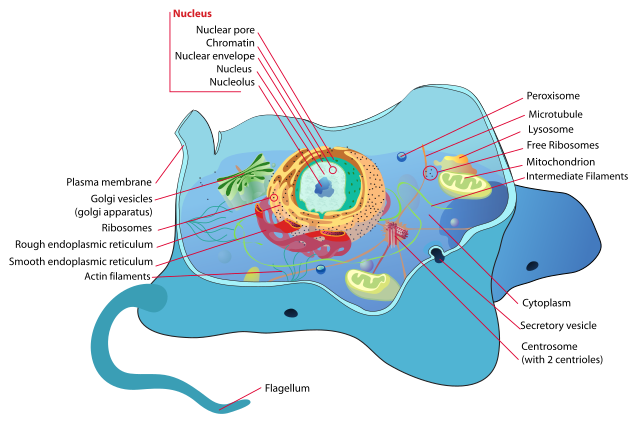
> Use the drawing tool to label the organelles you can identify.
>
> Click **Pen** in the left toolbar, then draw arrows and labels directly on the diagram.
---
# Discussion
Which organelle is responsible for energy production?
- [[ ]] Nucleus
- [[ ]] Ribosome
- [[X]] Mitochondria
- [[ ]] Golgi apparatus
Try it live — open in Presentation mode and click the Pen icon in the left toolbar to draw on the slide:
Full Template Demo
Use Cases
Live classroom annotation — The instructor draws arrows, underlines keywords, or circles important values directly on any slide during a lecture.
Handwriting-to-quiz — Combined with lia-canvas-ocr, students draw solutions and the annotation OCR button converts handwriting to text and fills quiz fields automatically.
Remote teaching — Annotations are visible during screen shares, making online lectures feel more interactive and whiteboard-like.
Highlighting and review — Use the pen to highlight key passages in a text-heavy slide and the toggle button to show/hide the overlay for before/after comparisons.
Technical Facts
| Runs in browser | Yes — script plugin |
| Server required | No |
| Macros | None — import activates toolbar |
| Toolbar position | Left edge, Presentation mode only |
| Colors | 10 presets |
| Pen width | 1–24 px |
| Eraser size | 4–80 px |
| OCR integration | Optional — load lia-canvas-ocr alongside |
| Community template | Yes (MINT-the-GAP) |
| License | MIT |
| Maintained | Version 0.0.1 |
Try It
Try in LiaScript Open in LiveEditor View on GitHubRelated Templates
- lia-canvas-ocr — draw answers and submit via LaTeX OCR
- lia-board-mode — full-screen width and font size slider for classroom display
- lia-navigation — collapsible hierarchical table of contents
- lia-freeze-v2 — freeze quiz answers into a shareable teacher review link