LiaEx in the Browser: Export Your Course Without Installing Anything
- Jihad Hyadi
- News , Feature
- September 30, 2026
In our last post about LiaEx we described how the LiaScript-Exporter grew from a command-line tool into a desktop app, a local web UI and a GitHub Action. There was still one step between writing a course and exporting it: you had to install something first.
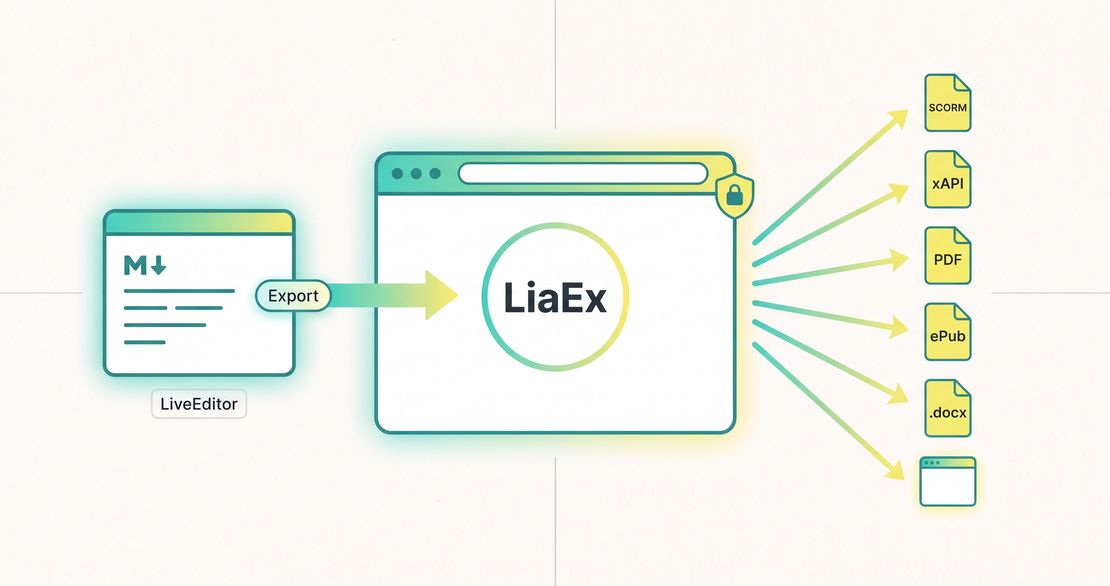
That step is now gone. There are two new ways to export a course:
- The LiaScript-Exporter web app runs entirely in your browser, with nothing to install.
- The LiveEditor has an export button that sends your whole project, including images and other files, straight to the exporter.
The Exporter Web App
Open the Exporter Web AppOpen liascript.github.io/LiaScript-Exporter and start exporting. It uses the same interface as the desktop app and liaex serve, but there is no server behind it. Everything runs in your browser, and your course is never uploaded anywhere. The finished package is built on your machine and downloaded directly.
The workflow has three steps:
- Project source. Drop your Markdown files, or a
.zipof the whole course folder, into the upload area. You can also import a course from a public GitHub repository by entering the repository URL, and optionally a branch, a subdirectory or a specific file. - Export target. Pick one of the known configurations (Moodle 3/4, ILIAS, OPAL, OpenOlat, Open edX, SCORM Cloud, LearnWorlds, …) or choose a format directly.
- Advanced settings (optional). These are the same format-specific options you know from the CLI: mastery score, iframe or embed mode for SCORM, LRS endpoint for xAPI, title and author for ePub/DOCX, and so on.
The following formats are supported in the browser:
| Category | Formats |
|---|---|
| LMS packages | SCORM 1.2, SCORM 2004, IMS, xAPI |
| Documents | PDF, ePub, DOCX |
| Web & data | Web (standalone site), JSON, RDF |
The app is available in English and German.
Good to know
Doing everything in the browser has a few limits:
- Android (APK) cannot be built in the browser, because it needs the Android SDK. Use the Docker image for that.
- PDF, ePub and DOCX are rendered in the browser’s memory. Very large courses can be slow or run out of memory; the desktop app is the better choice for those.
- One export runs at a time, and only while its status page is open.
- Only public GitHub repositories can be imported directly. For private repositories or other hosts such as GitLab, download the course and upload it as a
.zip.
Export Directly from the LiveEditor
If you write your courses in the LiveEditor, you no longer need to download and re-upload them. Open the Export menu of your project and choose LiaScript Exporter.
A dialog opens with the exporter embedded inside it. The editor then:
- connects to the exporter,
- packages the entire project, including the main course, every file in the file explorer, and embedded images, audio and video, into a ZIP,
- hands it to the exporter as if you had dropped the ZIP into the upload area yourself.
After that you only pick a preset or format and click export.
By default the editor connects to the hosted web app, so it works out of the box. The exporter address can be changed in the dialog, so you can also use:
- a local exporter, started with
liaex serve(http://localhost:3000), for example for Android exports or very large courses, - an exporter hosted by your institution, for example from the Docker image.
The editor remembers the address you used last. Because the LiveEditor runs over HTTPS, a remote exporter must also be served over HTTPS; only localhost is allowed over plain HTTP.
Which Option Should I Use?
| You want to… | Use |
|---|---|
| Export a course you are writing in the LiveEditor | The LiaScript Exporter entry in the LiveEditor’s share menu |
| Quickly export files or a public GitHub repo | The web app |
| Export very large courses to PDF/ePub/DOCX | The desktop app |
| Build an Android app | The Docker image or the CLI with the Android SDK |
| Export automatically on every push | The GitHub Action |
| Script exports or batch-process many courses | The CLI: npm install -g @liascript/exporter |
All of these use the same export engine, so a SCORM package for Moodle looks the same whichever route you take.
Try It Now
- Web app: liascript.github.io/LiaScript-Exporter
- LiveEditor: liascript.github.io/LiveEditor
- Desktop app: GitHub Releases
- Source: github.com/LiaScript/LiaScript-Exporter
If an export does not work in your LMS, or you have a configuration that works well with a platform we do not list yet, please open an issue and tell us.